 CabinetOS
Saves, states and sync
Two kinds of saving, both kept on your RomM server for you.
- Saves are the game’s own: the memory card, the battery save, the save slot in the game’s menu. Every system has them.
- Save states freeze the whole game at one moment. The built-in emulators have them (see What works where).
Saves
Nothing to do. When a game starts, the console fetches your newest save for it from RomM. When you leave the game, it sends the save back if it changed.
- Saves are written to the console first and sent in the background, so a slow or missing server never loses one. Anything not yet sent is sent again later: at start-up, every five minutes, and as soon as the server is back.
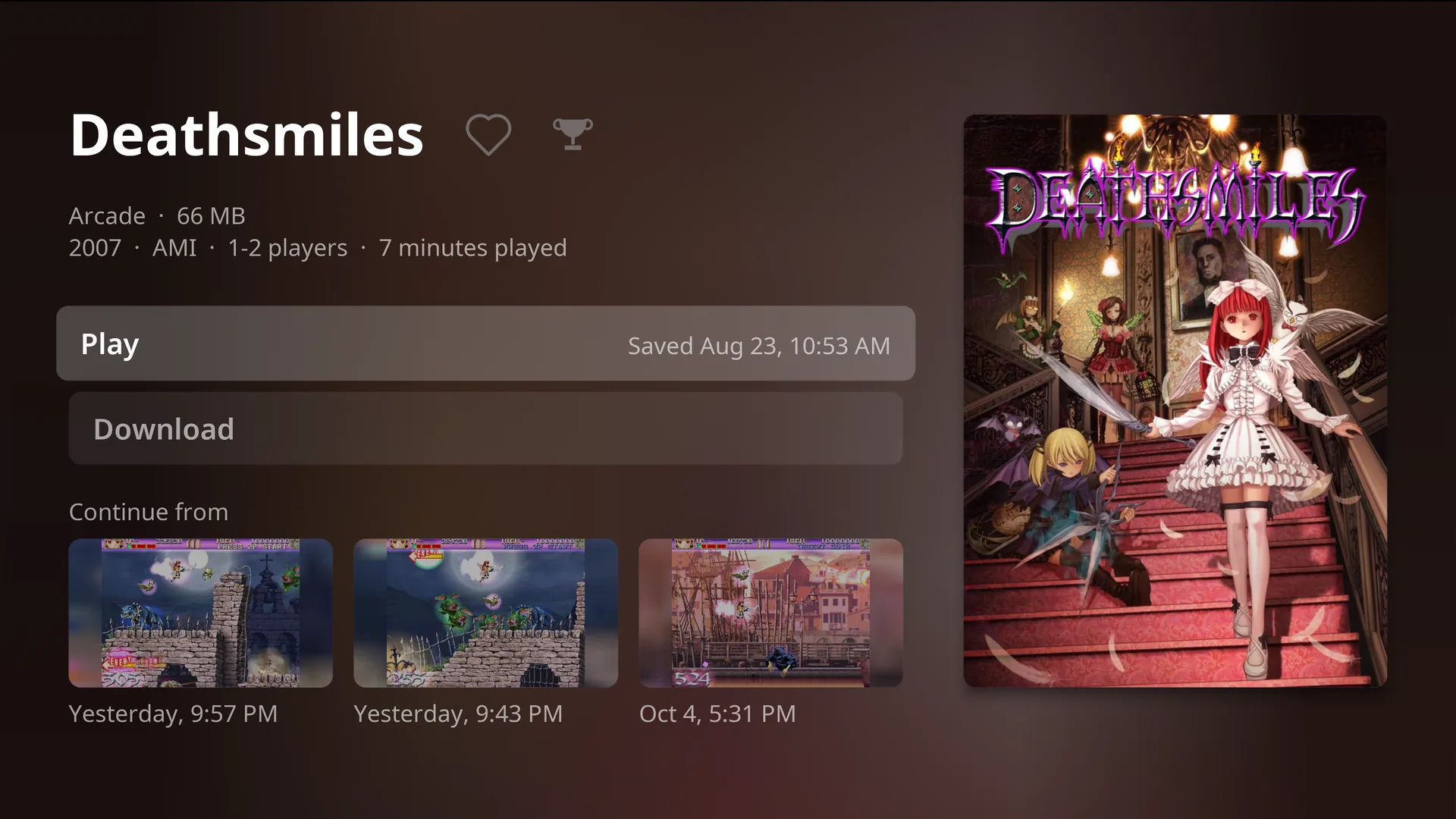
- The game’s page shows when it was last saved: Saved today, 8:17 PM.
- Every way out of a game sends the save: Exit to Home, the Power menu (Sleep, Restart, Power off), and a separate emulator closing, even if it crashed.
- Which copy wins: a save on the console that has not reached the server yet; otherwise the newest one on the server. A blank memory card never replaces one with saves on it.
- PS2 uses one memory card per game.
- Your Miis are copied into every Wii game.
Save states
- Save state in the pause menu saves the moment, with a picture of the game, to the console and to RomM.
- Load latest state goes back to your newest one. The game waits on Press (A) to continue so you are ready.
- A game’s page shows your three newest states under Continue from, each with its picture and time. Press one to play from there.
- Resume, the first game on Home, starts from the newest state too.
- The console keeps three states per game per person. Saving a fourth deletes the oldest, on the console and on RomM.
- There is no autosave: leaving a game keeps its save, not a state.
With In-game shortcuts on, the shortcut button with R1 saves a state and with L1 loads the newest.
Rewind and fast forward
On systems with save states, with In-game shortcuts on: hold the shortcut button and L2 to rewind up to about 15 seconds, or R2 to play at about four times speed. Rewind is kept in memory only.
Offline
Offline, the console uses the saves it last saw on the server, so a game starts from the same save it would online. New saves wait on the console and go up when the server is back.
Cabinet on Apple TV
Saves use the same names and formats as Cabinet, so a save made in one carries on in the other. Saves made in RomM’s web player or other apps are not read.
Each person’s own
Saves, states, play time and favourites belong to the person signed in. See Players and accounts.
Something wrong or missing here? See this page on GitHub or open an issue.